
In business-critical and mission-critical applications, logging is an undeniably important part. Logs can help catch and debug errors faster, especially in production and infrastructure-heavy systems like backend services.
Most of the time, I’m using NestJS for backend services and I used to view my backend logs in the terminal or in a weird file of the project. I have always felt that way of monitoring my backend system is quite awkward and not modern. This is why I decided to setup a web based logs viewer by leveraging the power of Winston, SQLite (in wal-mode) and Drizzle Studio.
For those of you who don’t know about Drizzle ORM, it’s a new ORM in the TypeScript ecosystem. It’s quite great and does many things well. I’m not going to do a marketing hype here but you can go check them out in more depth here
Here are the steps we’re going to follow to achieve that :
1 - Scaffold a new NestJS project
2 - Install necessary npm and system dependencies
3 - Create a new SQLite database file
4 - Configure Drizzle in the NestJS project
5 - Create our Drizzle schemas and generate migrations
6 - Setup the logging service that will connect to the sqlite database and write our logs data to it
6 - Setup a custom logger in our NestJS API
7 - Test our setup
Let’s start right away with the first step
Scaffolding a NestJS project is done using the NestJS CLI. So make sure you have it installed on your system and then run :
nest new nestjs-logs-viewerSo the first step is checked. We can now move on to the second step and install some useful dependencies.
In order to create the SQLite database that we will use for persisting the API logs, we need the SQLite command line utility. Therefore, I’m going to start by installing that. I’m on Ubuntu 20.04 and thus I’m going to run :
sudo apt-get install sqlite3With that, the SQLite command line utility is installed in our system. If you’re on a different platform, you can look for the instructions to do it on your system. But the point is that we need a tool that can help create a SQLite database file.
Now we’re going to install some dependencies in our NestJS project. For sake of time, here are the dependencies we actually need :
"class-transformer": "^0.5.1", // for validation purposes
"class-validator": "^0.14.0", // for validation purposes
"nest-winston": "^1.8.0", // for our custom logger
"uuidv4": "^6.2.13", // actually for our custom logger too
"winston": "^3.8.2", // for our custom logger
"better-sqlite3": "^8.5.2", // for logs data persistence
"drizzle-orm": "^0.28.5", // for logs data persistence
"drizzle-kit": "^0.19.13" // for migrations and our logs web ui
Grab the npm dependencies and paste them in the package.json of your NestJS project, then do ‘npm install’ to update your node_modules.
Now we can move to the third step and create our logs SQLite database. We are going to be a little bit organized and create a new NestJS module to start with. Let it be called log.
After making sure we’re in the directory of our project, we can run :
nest g mo logThis generates the log module in our NestJS project.
Let’s create a directory named commons in the log module and then run the following command :
sqlite3 src/log/commons/logs.dbThat generates the SQLite database file for us in the directory src/log/commons of our NestJS project.
Once the SQLite database file is available, we can go ahead and configure Drizzle in the project. Let us then create a file called drizzle-config.ts in the src/log/commons directory and paste the following content in it :
export default {
  schema: "src/log/commons/schema.ts",
  out: "src/log/commons/migrations",
  driver: 'better-sqlite',
  dbCredentials: {
    url: 'src/log/commons/logs.db',
  }
}
Let’s create the src/log/commons/schema.ts referenced by the previous code sample and paste the following content in it :
import { sqliteTable, text, integer } from 'drizzle-orm/sqlite-core';

export const requests = sqliteTable('requests', {
    id: integer('id').primaryKey(),
    correlationKey: text('correlation_key'),
    method: text('method'),
    url: text('url'),
    statusCode: text('status_code'),
    userAgent: text('user_agent'),
    clientIp: text('client_ip'),
    userId: text('user_id'),
    contentLength: text('content_length'),
    latency: text('latency'),
    metadata: text('metadata')
  }
);

export const logs = sqliteTable('logs', {
  id: integer('id').primaryKey(),
  level: text('level'),
  content: text('content')
})
The previous code sample should give you an idea of what data we actually want to persist and view later in our web interface.
Let’s go ahead and add some useful drizzle-kit scripts in our package.json. You can copy them below and paste them in your project :
"logs:migration:generate": "drizzle-kit generate:sqlite --config=src/log/commons/drizzle-config.ts",
"logs:migration:generate:custom": "npm run logs:migration:generate -- --custom",
"logs:migration:run": "drizzle-kit push:sqlite --config=src/log/commons/drizzle-config.ts",
"logs:data:view": "drizzle-kit studio --config=src/log/commons/drizzle-config.ts --port 3005 --verbose"
Let’s now generate the migrations files. I will generate two migrations files:
The first will be an empty migration that I will fill shortly and the second is the sql migration matching our schema.ts file.
To generate the empty migration, I’m going to run one of the drizzle-kit scripts I have just configured in the package.json :
npm run logs:migration:generate:customThe previous command generates an empty migration file in the src/log/commons/migrations directory. Let’s locate the sql file and update it. The final content of the file should be the following
-- Custom SQL migration file, put you code below! --
DROP TABLE IF EXISTS `logs`;
--> statement-breakpoint
DROP TABLE IF EXISTS `requests`;
Let’s now generate the schema migration by running the following script :
npm run logs:migration:generateThat command generates another sql file in our src/logs/commons/migrations directory. The content of that sql file should be something like below :
CREATE TABLE `logs` (
	`id` integer PRIMARY KEY NOT NULL,
	`level` text,
	`content` text
);
--> statement-breakpoint
CREATE TABLE `requests` (
	`id` integer PRIMARY KEY NOT NULL,
	`correlation_key` text,
	`method` text,
	`url` text,
	`status_code` text,
	`user_agent` text,
	`client_ip` text,
	`user_id` text,
	`content_length` text,
	`latency` text,
	`metadata` text
);
We can now move on to the step 6 and setup the logging service and its helpers.
Let’s create a file called constants in the src/log/commons directory. In that file, let’s paste the following content :
import { drizzle, BetterSQLite3Database } from 'drizzle-orm/better-sqlite3';
import * as Database from 'better-sqlite3';

export const PG_CONNECTION = 'PG_CONNECTION';

const sqlite = new Database('src/log/commons/logs.db');
sqlite.pragma('journal_mode = WAL');
export const db: BetterSQLite3Database = drizzle(sqlite);
After that, let’s create a file called dto.ts in the src/log/commons directory and paste the following content in it (we don’t actually need that file but it helps for type-safety) :
export class RequestDto {
    correlationKey: string
    method: string;
    url: string;
    statusCode: string;
    userAgent: string;
    clientIp: string;
    userId: string;
    contentLength?: string;
    latency: string;
    metadata?: string;
}

export class LogDto {
    level: string;
    content: string;
}
Let’s now create the file logging-service.ts in the same commons directory and paste the following content in it :
import { Inject, Injectable } from '@nestjs/common';
import { SQLITE_CONNECTION, db as sqliteDb } from './constants';
import { BetterSQLite3Database } from 'drizzle-orm/better-sqlite3';
import { LogDto, RequestDto } from './dto';
import { logs, requests } from './schema';

@Injectable()
export class LoggingService {
    constructor(
        @Inject(SQLITE_CONNECTION) private db?: BetterSQLite3Database,
    ) {
        this.database = this.db ? this.db : sqliteDb
    }

    private database: BetterSQLite3Database;

    async writeLog(logData: LogDto) {
        const insertedLog = this.database
            .insert(logs)
            .values({ ...logData })
            .returning();
        return insertedLog;
    }

    async writeRequest(requestData: RequestDto) {
        const insertedRequest = this.database
            .insert(requests)
            .values({ ...requestData })
            .returning();
        return insertedRequest;
    }
}

export const loggingService = new LoggingService();
Now let’s go ahead and update our log.module.ts. Its content should now look like below :
import { Module } from '@nestjs/common';
import { SQLITE_CONNECTION } from './commons/constants';
import { drizzle, BetterSQLite3Database } from 'drizzle-orm/better-sqlite3';
import { migrate } from "drizzle-orm/better-sqlite3/migrator";
import * as Database from 'better-sqlite3';
import { LoggingService } from './commons/logging-service';

@Module({
    providers: [
        {
            provide: SQLITE_CONNECTION,
            useFactory: async () => {
                const sqlite = new Database('src/log/commons/logs.db');
                sqlite.pragma('journal_mode = WAL');
                const db: BetterSQLite3Database = drizzle(sqlite);
                migrate(db, { migrationsFolder: "src/log/commons/migrations" });
                return db;
            },
        },
        LoggingService
    ],
    exports: [
        SQLITE_CONNECTION,
        LoggingService
    ],
})
export class LogModule { }
Once we have that setup, we are going to register two more things that are quite important for any backend service :
1- A global exception filter
2- A request logging interceptor
For the exception filter, let’s create a file called exception-filter.ts in the same commons folder and paste the following content in it :
import { ArgumentsHost, Catch, ExceptionFilter, HttpStatus, Logger } from '@nestjs/common';
import { Request, Response } from 'express';
import { getErrorStatus } from './constants';

@Catch()
export class AppExceptionFilter implements ExceptionFilter {

    private readonly logger = new Logger(AppExceptionFilter.name);

    async catch(exception: unknown, host: ArgumentsHost) {
        const context = host.switchToHttp();
        const response = context.getResponse<Response>();
        const request = context.getRequest<Request>();

        let message = (exception as any).message.message;
        let code = 'HttpException';
        let status = HttpStatus.INTERNAL_SERVER_ERROR;

        const errorStatus = getErrorStatus(exception);

        message = errorStatus.message;
        code = errorStatus.code;
        status = errorStatus.status;

        response.status(status).json(GlobalResponseError(status, message, code, request, { short: true }));
    }
}

export const GlobalResponseError: (
    statusCode: number,
    message: string,
    code: string,
    request: Request,
    options: { short: boolean }) => IResponseError = (
        statusCode: number,
        message: string,
        code: string,
        request: Request,
        options: { short: boolean }
    ): any => {
        return !options.short ? {
            statusCode: statusCode,
            message,
            code,
            timestamp: new Date().toISOString(),
            path: request.url,
            method: request.method
        } : message
    };

export interface IResponseError {
    statusCode: number;
    message: string | string[];
    code: string;
    timestamp: string;
    path: string;
    method: string;
}
We can notice that the exception-filter.ts is referencing a getErrorStatus function that we have not yet added to the constants.ts file. Let’s add it. Now our constants.ts file should look like below :
import { drizzle, BetterSQLite3Database } from 'drizzle-orm/better-sqlite3';
import * as Database from 'better-sqlite3';
import { BadRequestException, HttpException, HttpStatus, InternalServerErrorException, NotFoundException, UnauthorizedException } from '@nestjs/common';
import { ValidationError } from 'class-validator';

export const SQLITE_CONNECTION = 'SQLITE_CONNECTION';

const sqlite = new Database('src/log/commons/logs.db');
sqlite.pragma('journal_mode = WAL');
export const db: BetterSQLite3Database = drizzle(sqlite);


export const getErrorStatus = (exception: any) => {
    let message = (exception as any).message.message;
    let code = 'HttpException';
    let status = HttpStatus.INTERNAL_SERVER_ERROR;

    switch (exception.constructor) {
        case HttpException:
            status = (exception as HttpException).getStatus();
            message = getErrorsMessages(exception);
            break;
        case UnauthorizedException:
            status = (exception as HttpException).getStatus();
            message = getErrorsMessages(exception);
            code = (exception as any).code;
            break;
        case BadRequestException:
            status = (exception as BadRequestException).getStatus();
            message = getErrorsMessages(exception);
            code = (exception as any).code;
            break;
        case NotFoundException:
            status = (exception as NotFoundException).getStatus();
            message = (exception as NotFoundException).message;
            code = (exception as any).code;
            break;
        case Error:
            if ((exception as any).code === "ENOENT") {
                status = HttpStatus.NOT_FOUND
                message = `Endpoint or file not found ${exception}`;
                code = (exception as any).code;
            }
            break;
        default:
            status = HttpStatus.INTERNAL_SERVER_ERROR;
            message = (exception as InternalServerErrorException).message;
            code = (exception as any).code;
            break;
    }

    return {
        message,
        code,
        status
    }
}

export const getErrorsMessages = (exception: any) => {
    let exceptionResponse = (exception as BadRequestException).getResponse();
    let errorsObjects = (exceptionResponse as any).message
    if (errorsObjects instanceof Array && errorsObjects.some((error) => error instanceof ValidationError)) {
        let errorMessages: string[] = [];
        errorsObjects.forEach(
            (errorObject) => {
                let constraints = errorObject.constraints;
                Object.keys(constraints).forEach(
                    (key) => {
                        errorMessages.push(constraints[key]);
                    }
                );
            }
        );
        return errorMessages;
    }
    return (exceptionResponse as any).message;
}
Let’s now create the logging-interceptor.ts in the commons folder and paste the following content in it :
import {
  Injectable,
  NestInterceptor,
  ExecutionContext,
  CallHandler,
  Logger,
} from '@nestjs/common';
import { Observable } from 'rxjs';
import { tap } from 'rxjs/operators';
import { LoggingService } from './logging-service';
import { getErrorStatus } from './constants';
import { uuid } from 'uuidv4';

@Injectable()
export class LoggingInterceptor implements NestInterceptor {
  private readonly logger = new Logger(LoggingInterceptor.name);

  constructor(private loggingService: LoggingService) {}

  intercept(context: ExecutionContext, next: CallHandler): Observable {
    if (context.getType() === 'http') {
      return this.logHttpCall(context, next);
    }
  }

  private logHttpCall(context: ExecutionContext, next: CallHandler) {
    const request = context.switchToHttp().getRequest();
    const userAgent = request.get('user-agent') || '';
    const { ip: clientIp, method, path: url } = request;
    const correlationKey = uuid();
    const userId = request.user?.userId;

    const now = Date.now();

    return next.handle().pipe(
      tap({
        next: async (_) => {
          const response = context.switchToHttp().getResponse();
          const { statusCode } = response;
          const contentLength = response.get('content-length');
          const latency = Date.now() - now;
          await this.loggingService.writeRequest({
            correlationKey: correlationKey,
            method: method,
            url: url,
            statusCode: statusCode,
            userAgent: userAgent,
            clientIp: clientIp,
            userId: userId,
            contentLength: contentLength,
            latency: `${latency}ms`
          });
          this.logger.log(`${correlationKey} : ${method} : ${url} : ${statusCode} : ${userAgent} : ${clientIp} : ${userId} : ${contentLength} : ${latency}ms`);
        },
        error: async (error) => {
          const errorStatus = getErrorStatus(error);
          const { status } = errorStatus;
          const latency = Date.now() - now;
          await this.loggingService.writeRequest({
            correlationKey: correlationKey,
            method: method,
            url: url,
            statusCode: status.toString(),
            userAgent: userAgent,
            clientIp: clientIp,
            userId: userId,
            latency: `${latency}ms`,
            metadata: `${error.stack}`
          })
          this.logger.error(`${correlationKey} : ${method} : ${url} : ${status} : ${userAgent} : ${clientIp} : ${userId} : ${error} : ${latency}ms`);
        }
      }),
    );
  }
}
After setting up those two important components, let’s actually register them in our app.module.ts. Now our app.module.ts should have the following content :
import { ClassSerializerInterceptor, Module } from '@nestjs/common';
import { AppController } from './app.controller';
import { APP_FILTER, APP_INTERCEPTOR } from '@nestjs/core';
import { LoggingInterceptor } from './log/commons/logging-interceptor';
import { AppExceptionFilter } from './log/commons/exception-filter';
import { LogModule } from './log/log.module';
import { AppService } from './app.service';

@Module({
  imports: [
    LogModule
  ],
  controllers: [AppController],
  providers: [
    AppService,
    {
      provide: APP_FILTER,
      useClass: AppExceptionFilter,
    },
    {
      provide: APP_INTERCEPTOR,
      useClass: ClassSerializerInterceptor,
    },
    {
      provide: APP_INTERCEPTOR,
      useClass: LoggingInterceptor,
    },
  ],
})
export class AppModule {}
Let’s now setup the custom logger by creating a file called app-logger.ts in the habitual commons folder.
The content of the app-logger.ts will be as follows :
import { WinstonModule } from "nest-winston";
import { format, transports } from "winston";
import { loggingService } from "./logging-service";

const writeLog = (writeParams: {
  level: 'info' | 'warning' | 'error',
  log: any,
  persist: boolean
}) => {
  let level = writeParams.level;
  let log = writeParams.log;
  let persist = writeParams.persist;
  const logContent = `[Nest] 5277 - ${log.timestamp} : ${log.context} : ${log.level} : ${log.message} : ${log.stack}`
  if (persist) {
    loggingService.writeLog({
      level: level,
      content: logContent
    }).catch(error => {
      console.log(error);
    });
  }
  return logContent;
}

export const appLogger = WinstonModule.createLogger({
  transports: [
    new transports.Console({
      level: "info",
      format: format.combine(
        format.timestamp({ format: "DD/MM/YYYY, HH:mm:ss" }),
        format.colorize({ all: true }),
        format.printf((log) => {
          return writeLog({
            level: 'info',
            log: log,
            persist: false
          });
        }),
      ),
    }),
    new transports.Console({
      level: "warning",
      format: format.combine(
        format.timestamp({ format: "DD/MM/YYYY, HH:mm:ss" }),
        format.colorize({ level: true }),
        format.printf((log) => {
          return writeLog({
            level: 'warning',
            log: log,
            persist: false
          });
        })
      ),
    }),
    new transports.Console({
      level: "error",
      format: format.combine(
        format.timestamp({ format: "DD/MM/YYYY, HH:mm:ss" }),
        format.colorize({ level: true }),
        format.printf((log) => {
          return writeLog({
            level: 'error',
            log: log,
            persist: true
          });
        })
      ),
    }),
  ],
})
Now that the custom logger is ready, we can attach it to our NestJS application. This will be done in the main.ts file, so let’s update it to have the following content :
import { NestFactory } from '@nestjs/core';
import { AppModule } from './app.module';
import { appLogger } from './log/commons/app-logger';
import { NestExpressApplication } from '@nestjs/platform-express';
import { BadRequestException, ValidationError, ValidationPipe } from '@nestjs/common';

async function bootstrap() {
  const appOptions = {
    cors: true,
    rawBody: true,
    bufferLogs: true,
    logger: appLogger
  }
  const app = await NestFactory.create<NestExpressApplication>(AppModule, appOptions);
  app.useGlobalPipes(
    new ValidationPipe({
      exceptionFactory: (errors: ValidationError[]) => {
        console.log(errors)
        throw new BadRequestException(errors);
      },
      transform: true
    })
  );
  app.getHttpAdapter().getInstance().disable('x-powered-by');
  await app.listen(3000);
}
bootstrap();
Now let’s update the app.service.ts and app.controller.ts to do a simple crud with basic error handling to test everything.
The content of our app.service.ts should now be the following :
import { Injectable, NotFoundException } from '@nestjs/common';
import { IsNotEmpty, IsString } from 'class-validator';

@Injectable()
export class AppService {

  constructor() { }

  tools: string[] = [
    "knife",
    "drill",
    "scissors",
    "hammer"
  ]

  findTools() {
    return this.tools;
  }

  findToolByName(name: string) {
    let tool = this.tools.find(tool => tool === name);
    if (!tool) {
      throw new NotFoundException(`Tool of that name does not exist`)
    }
    return tool;
  }

  createTool(toolPayload: ToolDto) {
    this.tools.push(toolPayload.name);
    return this.tools;
  }


}

export class ToolDto {

  @IsString()
  name: string;
}
And here is the content of our updated app.controller.ts :
import { Body, Controller, Post, Get, Param } from '@nestjs/common';
import { AppService, ToolDto } from './app.service';

@Controller()
export class AppController {
  constructor(private readonly appService: AppService) {}

  @Get('tools/:name')
  getToolByName(@Param('name') name: string): string {
    return this.appService.findToolByName(name);
  }

  @Get('tools')
  getTools(): string[] {
    return this.appService.findTools()
  }

  @Post('tools')
  createTool(@Body() body: ToolDto): string[] {
    return this.appService.createTool(body);
  }
}
With all this setup in place, all incoming requests in our NestJS API are logged in the SQLite database as well as all the application errors logs (Yeah I chose to persist only errors logs in the SQLite database to avoid so much overhead to the backend).
Now we can view our logs and requests in Drizzle Studio by running the following command :
npm run logs:data:viewThat command launches the Drizzle Studio on port 3005 (you can actually change that).
And we have the following interfaces :
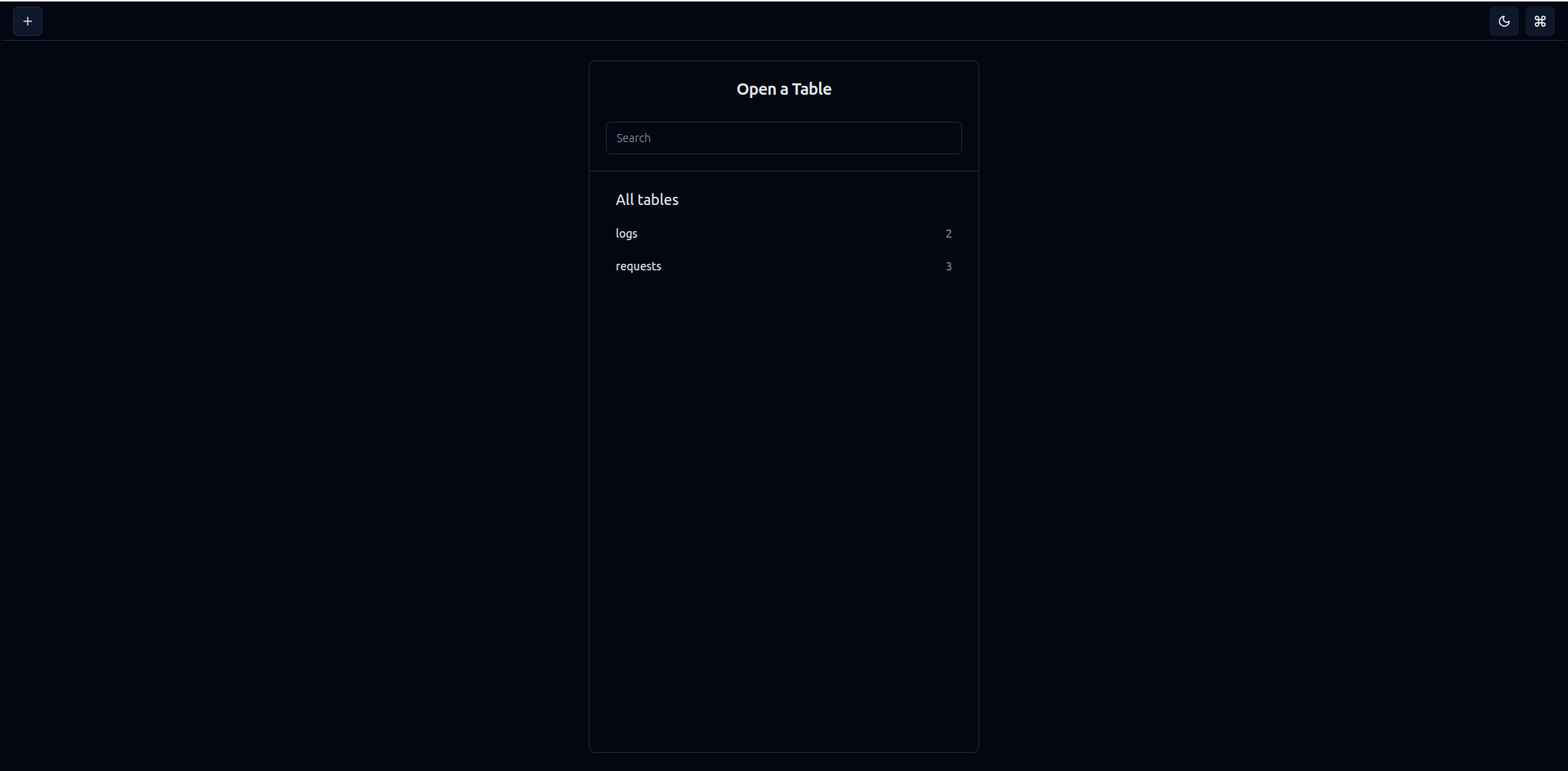
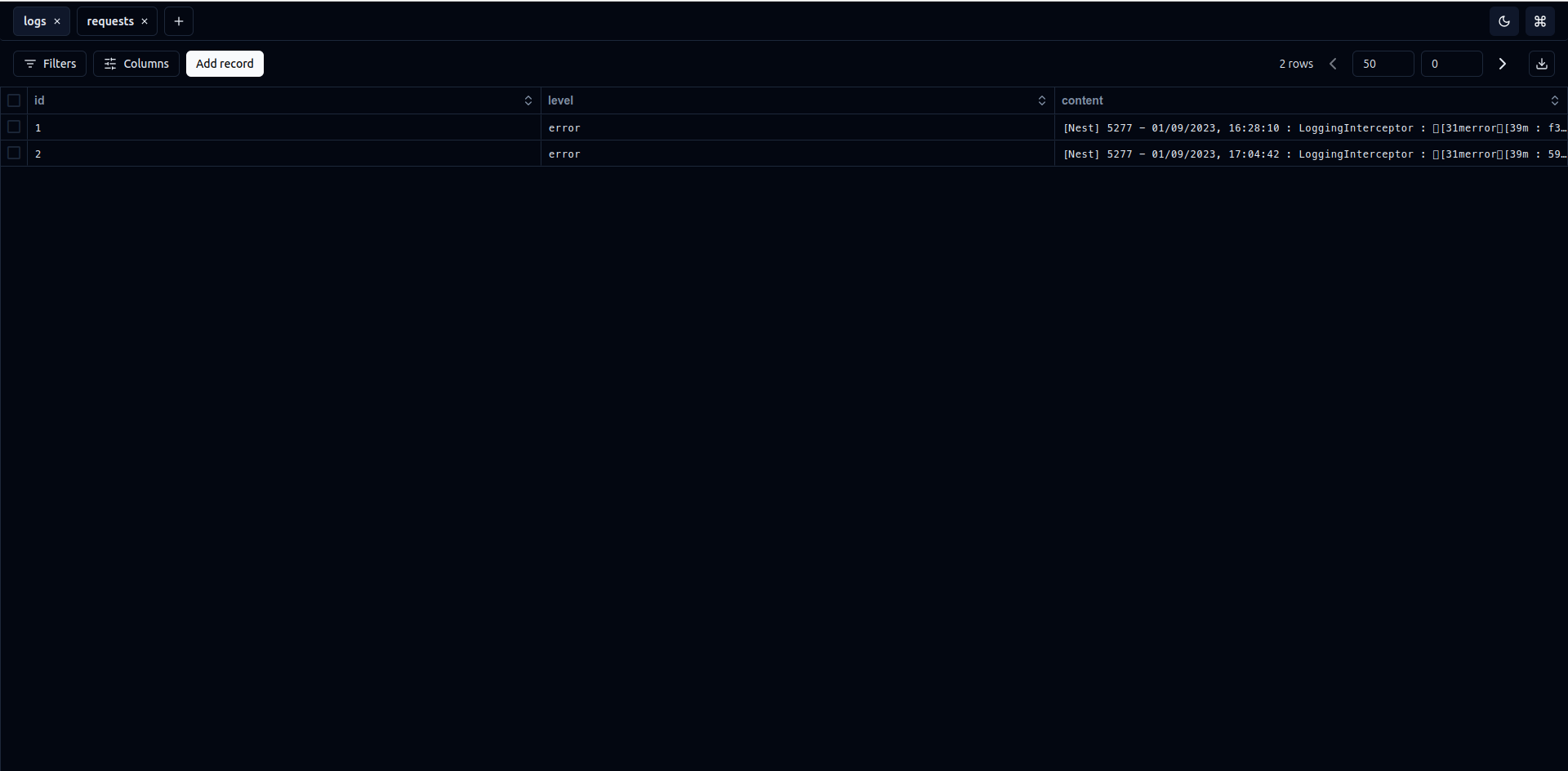
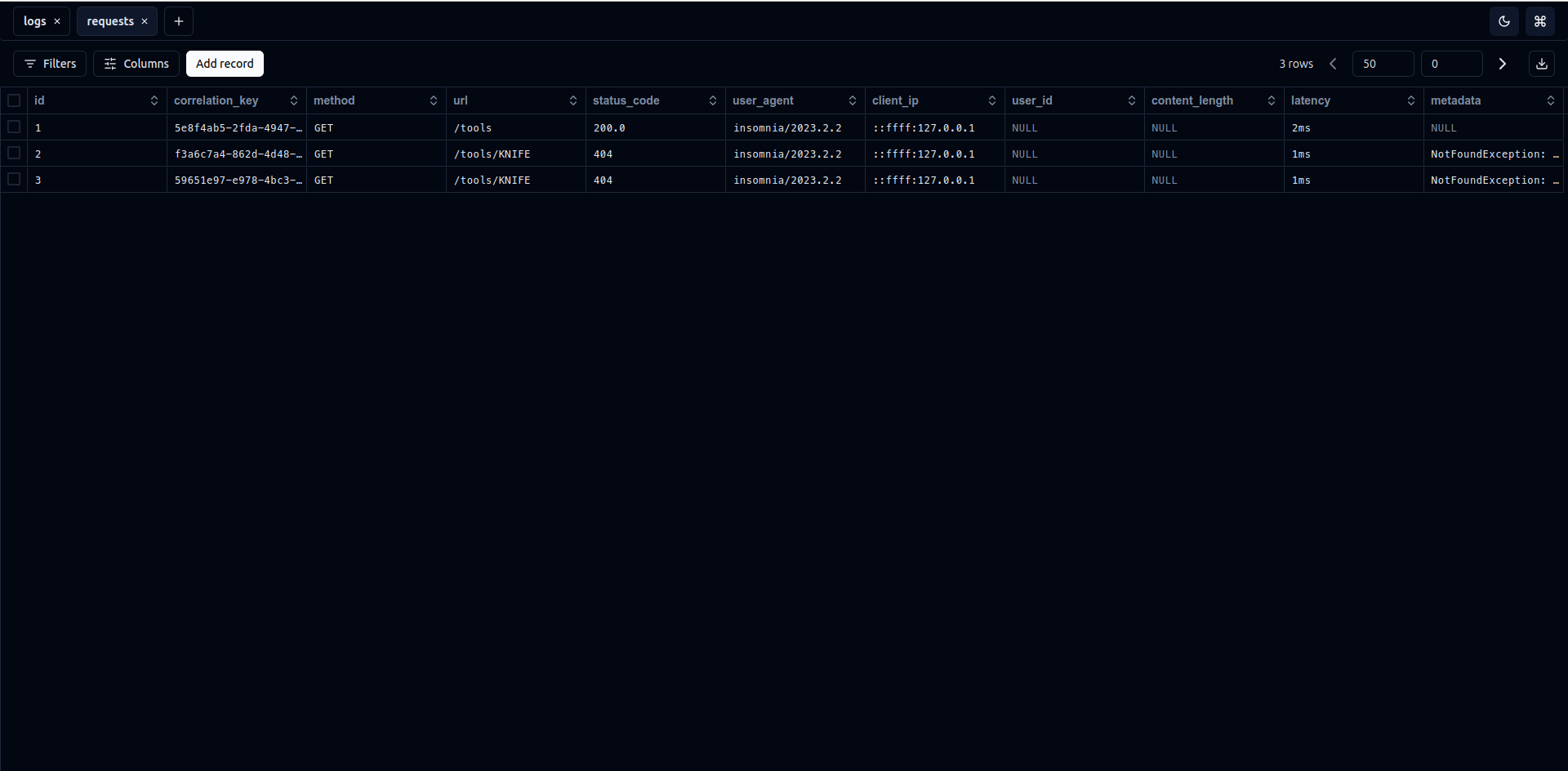
As for now, we can view the latest logs and requests by refreshing the Drizzle Studio web application, which could be a problem for some of us. Therefore, as future plan we can create our own web interface, add websockets support to it and orchestrate everything in order to have a realtime logs viewer. I leave that as an exercise to you.
All the code samples in this article are available in this github repository
Thank you for reading along and see you in the next one.
Until then peace, fellow Nesters !