
Sometimes the websocket realtime part of Directus is not enough, Sometimes we need something more robust, more scalable and more flexible for our realtime functionalities. This is where Socket.IO comes in. I was trying to integrate Socket.IO in Directus recently and when I looked over the internet I didn’t find pretty much any resource about the topic. For whatever reason. Anyway, I decided to do some write up about the topic for my future self and for you kind friends on the internet. Let’s dive in.
Our purpose here is to have something like the existing realtime functionality built in Directus that uses native websockets, but we are going to be using Socket.IO. Implementing the realtime ourselves using Socket.IO allows us to have more flexibility, we could then customize the events as we want.
We will assume that you already have a Directus project up and running. If not you can set one up quickly with this command:
npx directus initFollow the prompts and finish the setup properly. You can choose the default installation scheme which uses sqlite or you can setup other database drivers as per your need.
You can find more information here
Once the Directus project is up and running, we will install Socket.IO. To do that make sure you cd into the Directus project folder and then issue the following command :
npm install socket.ioAt this point, our project structure should now be something like this :
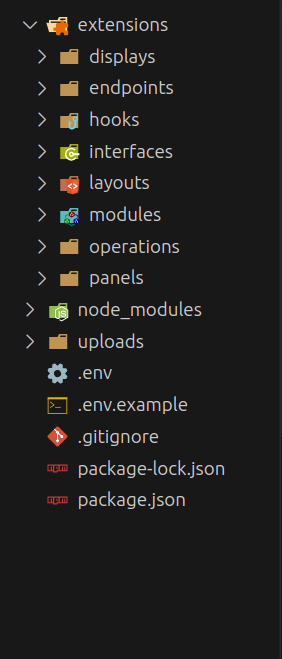
The directory of our interest is the extensions/hooks directory. The logic we are going to write will be living in there.
Actually the idea of all we want to do here is to register a Directus hook that will emit an event to clients through Socket.IO each time an item is created in our DB.
Pretty straightforward but we need to make sure certain things are ready. With Directus alternatives like Strapi it is possible to register the Socket.IO server on the Strapi server, then attach it to strapi services which makes it available globally in the strapi project. But with Directus, we need to proceed in a different way. As @brainslug3663 explained to me on the Directus Discord Server:
There is no easy way to persist an object across extensions im aware of 🤔️ What you'd need to do is have an extension maintaining the connection like
socketio-setupand then talk to that extension via the extension event emitter
Great !! We are going to build on that idea and find the Directus way. Let’s now create in the extensions/hooks directory a folder named crud that contains an index.js file. Next, we are going to create another folder in the hooks directory, which we are going to name realtime. The realtime folder includes an index.js file as well.
In the crud’s index.js file, we are going to register a hook that will listen to items actions (create, read, update, delete). On an item create for example we will emit an event via the emitter parameter of that hook. We will then capture the emitted event in our realtime hook
Following is the content of our crud’s index.js file
module.exports = function registerHook({ action, filter }, context) {
	const { emitter, services, getSchema } = context;
	action('items.create', async ({ payload, key, collection }, { database, schema, accountability }) => {
		const { ItemsService } = services;
		const itemsService = new ItemsService(`${collection}`, { schema, accountability })
		const record = itemsService.readOne(`${key}`, {
			fields: ["*.*.*"]
		})
		const actionPayload = { payload, keys: [key], collection, record }
		emitter.emitAction('data.create', actionPayload)
        return actionPayload;
	});
	action('items.update', async ({ payload, keys, collection }, { database, schema, accountability }) => {
		const { ItemsService } = services;
		const itemsService = new ItemsService(`${collection}`, { schema, accountability });
		const records = await itemsService.readMany([...keys], {
			fields: ["*.*.*"],
			sort: ["view_order"]
		});
		const actionPayload = { payload, keys: keys, collection, records };
		emitter.emitAction('data.update', actionPayload);
        return actionPayload;
	});
	filter('items.delete', async (input, { event, collection }, { database, schema, accountability }) => {
		const keys = [...input]
		const { ItemsService } = services;
		const itemsService = new ItemsService(`${collection}`, { database, schema, accountability });
		const records = await itemsService.readMany([...keys], {
			fields: ["*.*.*"],
			sort: ["view_order"]
		});
		const actionPayload = { keys: keys, collection, records }
		emitter.emitAction('data.pre-delete', actionPayload)
        return actionPayload;
	});
	action('items.delete', async ({ keys, collection }, { database, schema, accountability }) => {
		const actionPayload = { keys: keys, collection }
		emitter.emitAction('data.delete', actionPayload)
        return actionPayload;
	});
}
And then in the realtime’s index.js file we will put in the following lines of code:
module.exports = function registerHook({ action }, { emitter }) {
	action('server.start', async ({ server }) => {
		const { Server } = require("socket.io");
		const socketIOServer = new Server(server, { cors: true });
		console.log('socketio server set up');
		emitter.onAction('data.create', (payload) => {
			console.log("broadcasting create event via socketio")
			socketIOServer.emit('data.create', payload);
		});
		emitter.onAction('data.update', (payload) => {
			console.log("broadcasting update event via socketio")
			socketIOServer.emit('data.update', payload);
		});
		emitter.onAction('data.pre-delete', (payload) => {
			console.log("broadcasting pre-delete event via socketio")
			socketIOServer.emit('data.pre-delete', payload);
		});
		emitter.onAction('data.delete', (payload) => {
			console.log("broadcasting delete event via socketio")
			socketIOServer.emit('data.delete', payload);
		});
        return server;
	});
}
Finally our project structure would be like shown below:
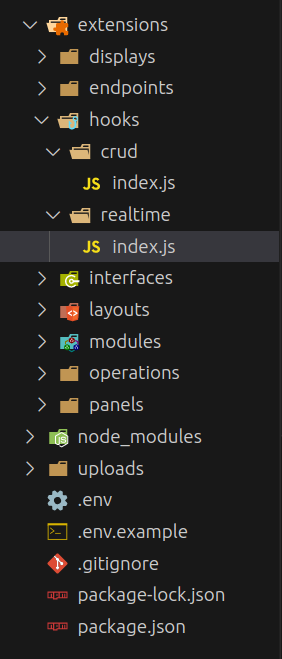
Once you have the same structure and all the code setup you can start the Directus server
npx directus startAnd test the Socket.IO server with clients like Firecamp. . Thank you for following along and see you in the next one.